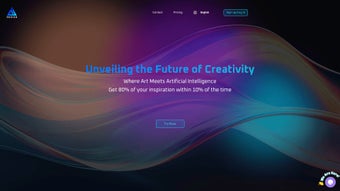

Download AI Designs – AI‑Powered Visual Creation Tool for Logos, Packaging & Posters
Overview
AI Designs is a cutting‑edge, web‑based application that merges artificial intelligence with modern design principles to turn abstract ideas into polished visual assets. Whether you are a branding professional looking for a fresh logo, a marketer needing eye‑catching packaging concepts, or a creator seeking dynamic poster layouts, AI Designs offers an intuitive, collaborative workflow that feels as natural as sketching on paper. The platform’s AI engine analyses textual prompts, mood boards, or sketch uploads, then iteratively refines the output by learning from user feedback, ensuring each design carries emotional resonance and visual clarity.
Users can start from a blank canvas, choose from a curated library of pre‑made concepts, or upload a quick hand‑drawn mock‑up; the AI instantly generates multiple variations, allowing you to select the direction that best fits your brand voice. One of the most compelling aspects is the high‑resolution, vector‑ready files the system produces, which means you can go straight from concept to print without any additional rasterisation steps. Because AI Designs runs entirely in the browser, there is no need for heavy local installations, and the service automatically updates to the newest AI model as soon as it becomes available.
Security is baked into the architecture: all data transfers are encrypted with TLS 1.3, projects are stored in GDPR‑compliant cloud servers, and two‑factor authentication can be enabled for added protection. In short, AI Designs combines the creative freedom of a design studio with the scalability of cloud computing, making professional‑grade visuals accessible to anyone with an internet connection.
Key Features and How to Get Started
Feature List
- Natural‑language prompt processing – describe your concept in plain English and watch the AI translate it into visual drafts.
- AI‑driven style transfer – apply vintage, minimalistic, futuristic, or hand‑drawn aesthetics with a single click.
- Real‑time collaborative editing – invite teammates or clients to edit colors, typography, and layout instantly, with changes reflected for all participants.
- High‑resolution export – download SVG, PNG, PDF, or EPS files that are ready for print, web, or large‑format signage.
- Pre‑made AI art gallery – browse thousands of royalty‑free designs for instant licensing, saving you hours of brainstorming.
- Version history & rollback – keep track of every iteration, compare past versions, and revert to a previous design if needed.
- Secure cloud storage – all projects are saved in encrypted servers, with GDPR compliance and optional end‑to‑end encryption.
- API access – integrate AI Designs generation into your own apps, CMSs, or e‑commerce platforms via a robust RESTful API.
- Custom brand kits – upload your brand assets (fonts, color palettes, logo files) so the AI respects your visual identity.
- Smart asset suggestions – the system recommends complementary icons, patterns, and stock photos based on your design context.
Installation & Usage Instructions
Because AI Designs is a fully web‑based solution, there is no traditional software download or installation process. Follow these simple steps to start creating:
- Visit the official website: Navigate to aidesigns.com using any modern browser (Chrome, Firefox, Edge, Safari). The site automatically detects your device and presents an optimized UI for desktop or mobile.
- Create an account: Click “Sign Up,” provide an email address, and set a strong password. You can also sign in with Google, Microsoft, or Apple ID for faster onboarding. After registration, you’ll receive a verification email to secure your account.
- Choose a plan: AI Designs offers a free tier with limited daily generations and a paid “Pro” plan that unlocks unlimited renders, priority GPU processing, commercial licensing, and premium export formats. You can switch plans at any time from the dashboard.
- Set up your brand kit (optional): Upload your brand fonts, color palettes, and logo files. The AI will prioritize these assets when generating concepts, ensuring consistency across all outputs.
- Start a new project: Click “New Design,” then either type a textual prompt (e.g., “eco‑friendly organic tea packaging with pastel tones”) or upload a rough sketch. The AI will analyze the input and present 4‑6 initial concepts within seconds.
- Iterate with the AI: Use the “Refine” button to guide the AI toward specific elements such as typography, layout, or mood. You can lock certain layers, adjust color sliders, or request alternative compositions. Each refinement generates new variations, allowing you to hone in on the perfect design.
- Collaborate in real time: Invite teammates via email or share a public link. Collaborators can comment, suggest changes, or edit directly, making the feedback loop seamless.
- Finalize & Export: Once satisfied, select “Export,” choose the desired file format (SVG for vectors, PNG for web, PDF for print, etc.), and download directly to your device or save to the built‑in cloud storage. Exported assets retain all vector data, layers, and color profiles.
- Maintain your projects: All designs are automatically saved in your personal workspace. You can organize projects into folders, tag them for easy retrieval, and archive older versions without losing history.
The platform updates automatically to the latest AI model, so you always benefit from the newest design capabilities without manual patches. If you ever need offline access, you can install the Progressive Web App (PWA) version, which caches your recent projects for quick viewing and minor edits.
Compatibility and System Requirements
AI Designs runs on any operating system that supports a modern web browser, including Windows 10/11, macOS Ventura and later, Linux distributions, Chrome OS, Android 8.0+ and iOS 13+. Because the heavy lifting is performed on remote servers, the local device only needs sufficient RAM (2 GB minimum) and a stable internet connection (minimum 5 Mbps recommended). The platform is fully responsive, adapting to desktop, tablet, and smartphone screens, which means you can sketch ideas on the go using your phone’s camera and immediately refine them on a larger screen later.
For users who prefer a desktop‑only experience, AI Designs also offers a lightweight Progressive Web App (PWA) that can be “installed” from the browser. The PWA runs offline in a limited mode, allowing you to view saved projects and make minor edits, but full AI generation requires an online connection. The PWA stores a local cache of the UI assets, so load times are near‑instant even on slower networks. Additionally, the service supports hardware acceleration for browsers that expose WebGL, which can improve the responsiveness of the real‑time editing canvas on capable machines.
If you work behind a corporate firewall, AI Designs provides an optional self‑hosted gateway that tunnels API requests through your own secure server, ensuring compliance with strict IT policies. The gateway can be deployed on Azure, AWS, or on‑premises infrastructure, and it uses OAuth 2.0 for authentication. While most users will find the standard cloud version more convenient, this flexibility guarantees that the tool can fit into virtually any IT environment.
Pros and Cons – Quick Verdict
Pros
- AI‑driven creativity: Generates fresh concepts you might never think of yourself, expanding the creative horizon for both novices and seasoned designers.
- Zero‑install, cross‑platform: Works on Windows, macOS, Linux, Android, and iOS via any modern browser, eliminating compatibility headaches.
- High‑resolution, vector exports: Provides SVG, EPS, PDF, and other print‑ready formats, saving time on file conversion.
- Real‑time collaborative editing: Teams can co‑create, comment, and iterate simultaneously, reducing the feedback loop from days to minutes.
- Secure cloud storage: Encrypted backups protect intellectual property, and two‑factor authentication adds an extra security layer.
- Scalable pricing model: A generous free tier for hobbyists, while the Pro plan unlocks unlimited renders, priority processing, and commercial licensing.
- Extensive brand kit support: Upload custom fonts, colors, and logos so the AI respects your existing visual identity.
- API integration: Developers can embed AI‑generated designs directly into their own workflows, CMSs, or e‑commerce platforms.
Cons
- Dependence on internet connectivity – offline capabilities are limited to viewing and minor edits; full AI generation requires a stable connection.
- AI may produce generic results if prompts are vague; achieving truly unique output often needs several refinement cycles.
- Export of some premium assets incurs additional licensing fees, especially for high‑value stock illustrations.
- Learning curve for non‑designers unfamiliar with design terminology; while the natural‑language interface helps, mastering style controls takes practice.
- Advanced features such as brand kits and API access are locked behind the Pro plan, which may be a barrier for very small teams.
Overall Rating: 4.5/5 – AI Designs delivers a powerful blend of AI creativity and professional‑grade export options, making it a standout choice for designers, marketers, and entrepreneurs alike.
Frequently Asked Questions
Is AI Designs really free to use?
AI Designs offers a free tier that includes up to five AI‑generated designs per month, access to the public gallery, and basic export options (PNG and JPG). For unlimited creations, commercial licensing, priority GPU processing, and vector‑format exports, you need to upgrade to the Pro plan, which starts at $19.99 per month. The free tier is ideal for testing the platform and for occasional hobby projects.
Can I export designs in vector format?
Yes. All premium exports include SVG, EPS, and PDF formats, ensuring your artwork remains crisp at any size. The free tier provides PNG and JPG exports, which are suitable for web use but not for large‑scale printing. Vector files can be opened directly in Adobe Illustrator, CorelDRAW, or any other vector‑editing software.
How secure is my data on AI Designs?
AI Designs employs end‑to‑end encryption (TLS 1.3) for all data transfers, stores projects in GDPR‑compliant data centers, and gives you full control over project deletion. You can enable two‑factor authentication (2FA) for added security, and the platform offers granular permission settings so you can decide who can view or edit each project.
Do I need any design experience to use the tool?
No prior experience is required. The natural‑language prompt system guides beginners, while advanced controls let seasoned designers fine‑tune typography, spacing, and color palettes. Interactive tutorials and a knowledge base are available directly within the app to help new users get up to speed quickly.
Can I integrate AI Designs into my own workflow?
Absolutely. The platform provides a RESTful API with authentication keys, allowing developers to trigger design generation directly from other apps, CMSs, or e‑commerce platforms. Documentation includes example code in Python, JavaScript, and PHP, and the API supports batch processing for high‑volume use cases.
Conclusion – Why You Should Download AI Designs Today
AI Designs bridges the gap between imagination and execution by delivering AI‑enhanced creativity that is both accessible and professional. Its cloud‑first architecture means you can start designing on a smartphone, polish on a laptop, and export ready‑to‑print files without ever installing heavy software. Whether you’re a solo entrepreneur needing a quick logo, a packaging specialist looking for fresh concepts, or a marketing team that wants to speed up creative cycles, AI Designs offers the tools, security, and flexibility to meet those demands. The combination of natural‑language prompts, real‑time collaboration, and vector‑grade outputs makes it a compelling choice for anyone who values speed without sacrificing quality.
Ready to transform your ideas into visual art? Click the button below to sign up for a free account, explore the AI gallery, and experience the future of design today.



.png)



